Don't Connect Your Custom Domain to Medium Until You Read This
Mohamed Bakry
A branded address looks professional until search engines drop your entire library from the SERP. Here is what broke behind the dash
Connecting a custom domain to Medium felt like a sensible business decision.
The publication would keep Medium’s familiar reading experience while gaining a professional address under my own brand. Readers would see a URL such as:
blog.howtoprofitai.com/article-name
instead of:
medium.com/how-to-profit-ai/article-name
Nothing about that choice felt dangerous. The articles still opened. The publication looked normal. Writers continued publishing. And got Millions of traffic with huge earnings.
Then the traffic faded…
At first, I blamed the usual suspects. Perhaps readers had changed. Perhaps Google needed more time. Perhaps the sitemap had not been submitted correctly.
Tried to fix all possibilities for 5 months, and nothing changed.
Then a friend messaged me and said he wasn’t really convinced by the publication traffic numbers that have been showing up on his dashboard lately.
Now I am sure it’s a serious problem.
The truth appeared after I stopped looking at the publication as a reader and started examining the reports behind it.
I connected Google Search Console, submitted the sitemap, and tried to investigate the technical details.
Guess what?!!!
Google was finding hundreds of URLs, but it was choosing not to keep most of them in its search results.
The short answer
A Medium custom domain or subdomain does not automatically damage search traffic.
The risk begins when the same article becomes available through several addresses, while the sitemap, page settings, redirects, and internal links disagree about which address is the official one.
My reports revealed four major problems:
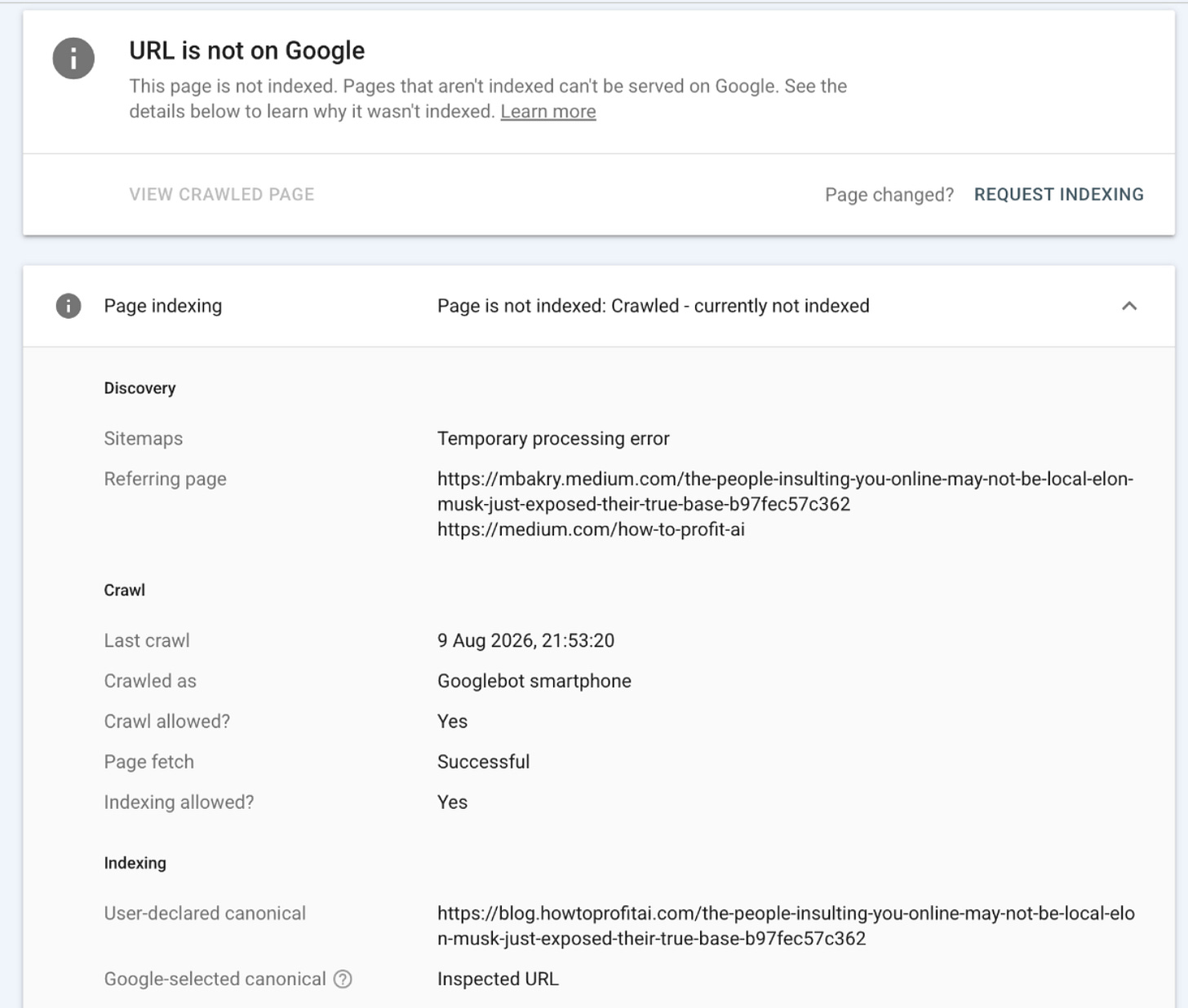
- Google knew about several versions of many articles.
Screenshot by the Author. Google Console
Duplicate addresses are not automatically a violation. The problem appears when the surrounding signals disagree about which version should be treated as the official one.
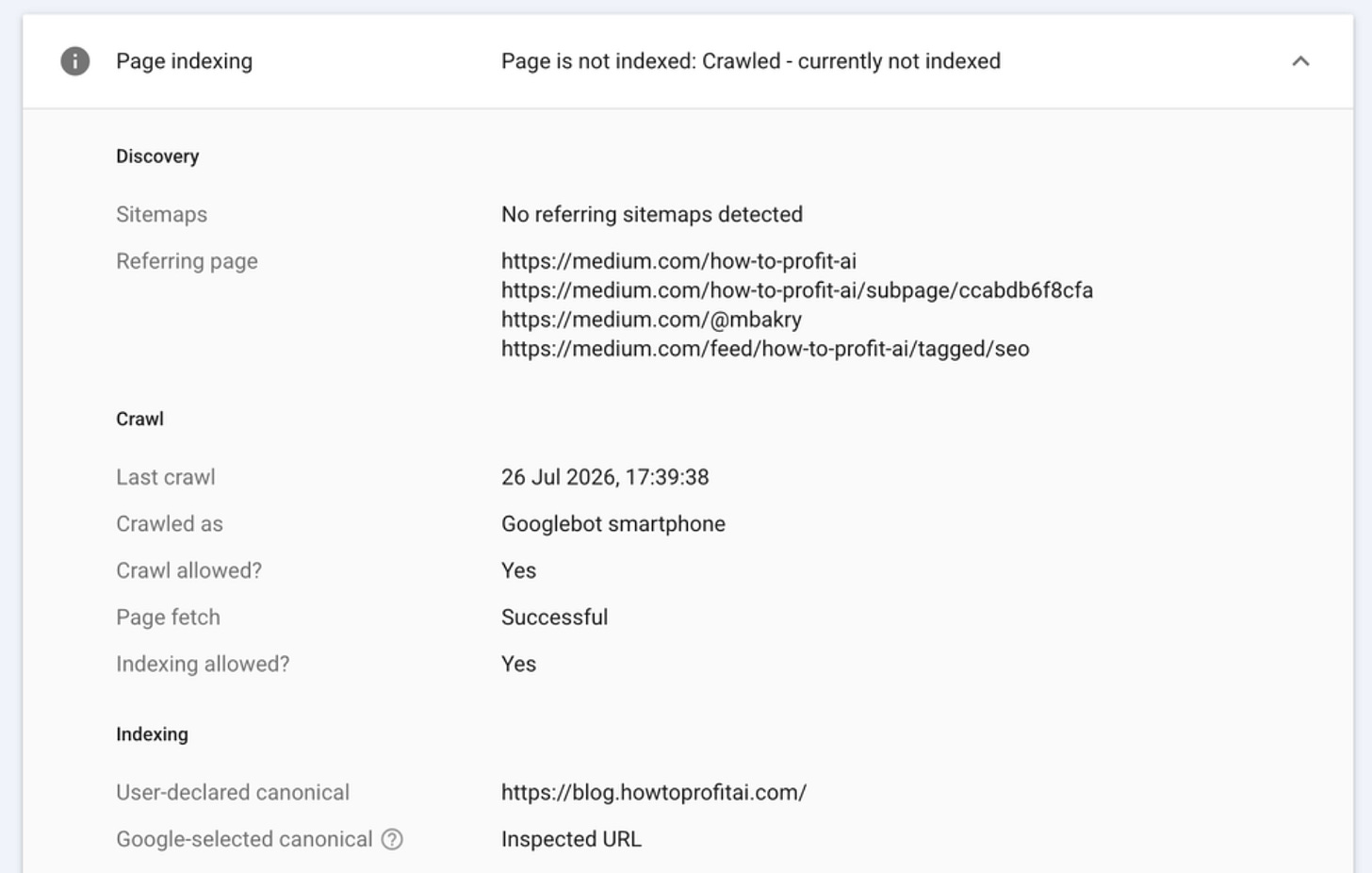
- The sitemap listed one address while some pages declared another address as official.
Screenshot by the Author. Google Console
- A significant 98% of articles remained unindexed even after the address problems were removed, pointing to an additional editorial-quality issue.
- There was no manual penalty in Search Console. This was not a case of Google banning the publication. It was a case of unclear ownership, unnecessary pages, and articles that Google did not consider strong enough to keep.
Google never gives a private explanation for every rejected page, so no honest audit can claim one proven cause. However, the reports provided enough evidence to see why the publication had become difficult to understand and difficult to trust.
The first screenshot changed the whole investigation
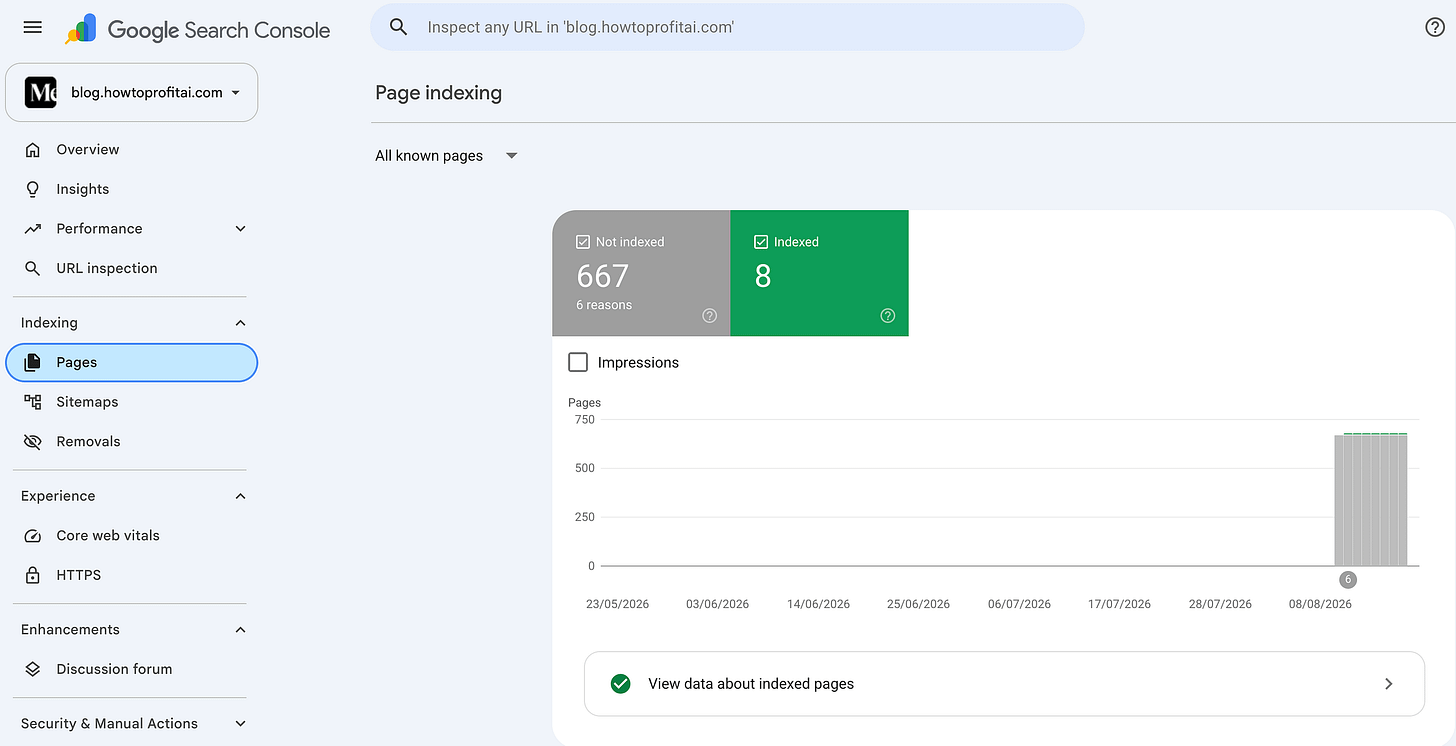
Screenshot by the Author. Google Console
Google knew about 667 URLs, but only eight were indexed at the time of this report, 5 of them I indexed manually.
The screenshot showed:
- 667 URLs not indexed even though they were crawled successfully
- Only 8 URLs indexed
That was not a minor delay. Google knew the pages existed, yet almost the entire publication remained outside its search results.
To simplify the technical jargons.
“Discovered” means Google knows the address exists but has not visited it yet.
“Crawled” means Google visited the page, read it, and still decided not to include it, even though some of them gained millions of traffic and thousands of conversational comments.
That distinction mattered. Waiting might help a page Google has not visited, but waiting alone rarely repairs a page Google has already examined and declined.
A sitemap does not guarantee indexing. It simply gives Google a list of URLs that the publisher considers important. Google still decides whether each page deserves to be crawled, treated as the official version, and included in search results. Google explains that sitemaps support discovery but do not guarantee indexing.
The important question was no longer, “Can Google find my sitemap?”
It had clearly found the URLs.
The real question became, “What did Google find after opening them?”
That was the shocking part…
Connecting the subdomain with Bing Webmaster
I wanted to get more in-depth technical reports, so I connected the subdomain with bing with master and performed some scans and investigation, and I figured out the core problem.
I found that all 575 URLs on the sitemap trigger this error:
HTTP 400–499 errors
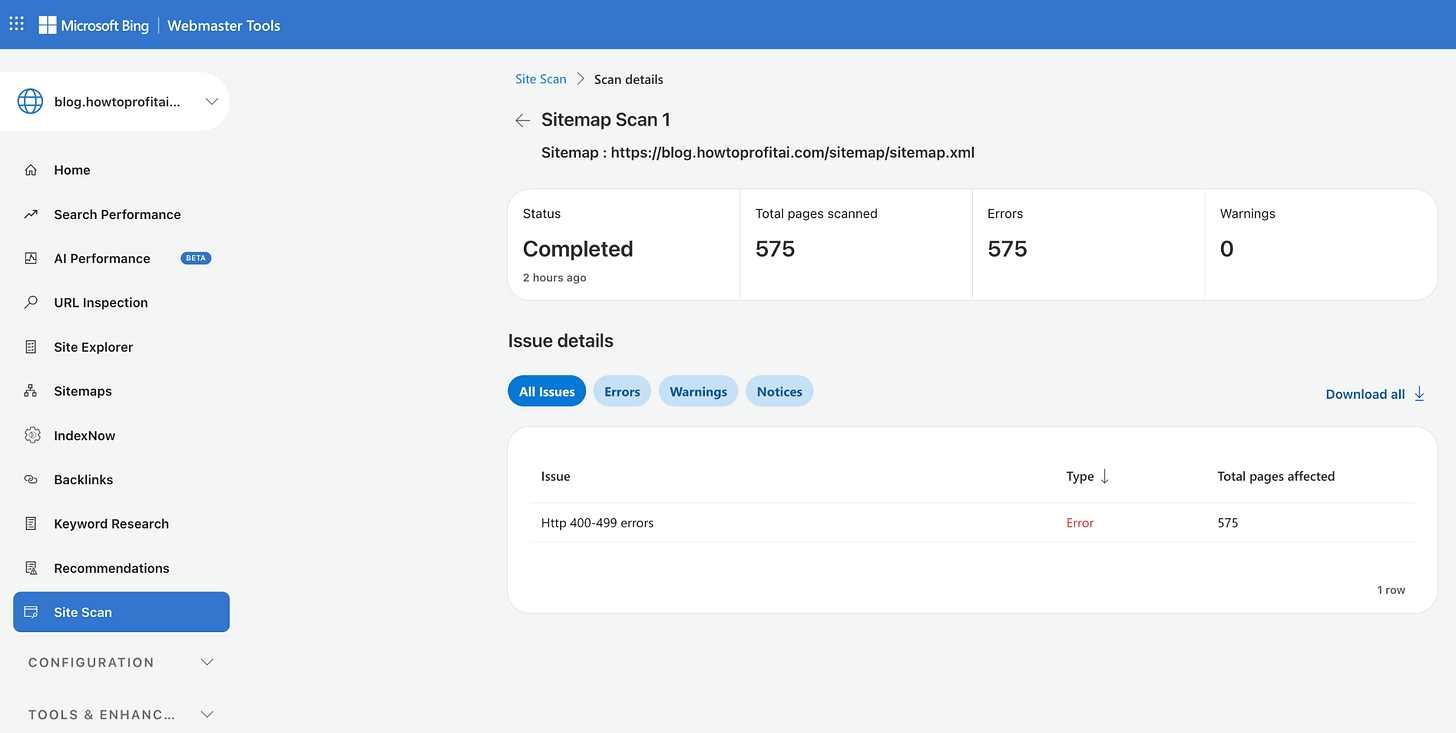
Screenshot by the Author. Bing Webmaster
But they are working fine when I click on any, but for unknown reasons, search engines trigger errors when trying to read them.
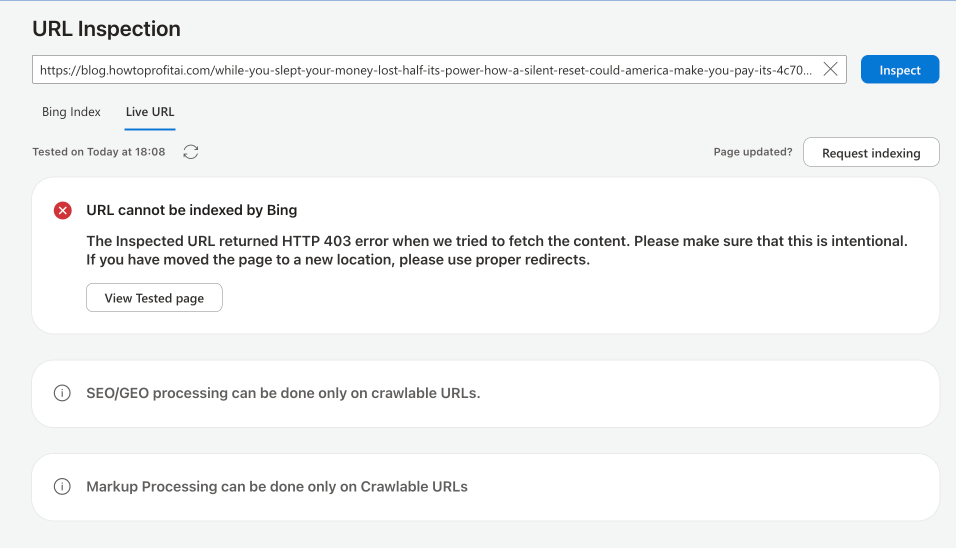
Screenshot by the Author. Bing Webmaster
This is so weird…
This was one of the hidden costs of using a platform where the publication owner cannot fully control the structure of the site.
The sitemap and the pages were telling different stories
Every page can quietly declare its preferred address. This is called a canonical URL, but I prefer to describe it as the story’s official home address.
Google uses that address to decide which version should appear in search results and where links and reputation should be gathered.
Sitemap article URLs were not clearly confirming themselves as the official version.
That created a contradiction.
The sitemap was effectively saying:
Please index this address.
The page itself was saying:
Another address is the official version.
Google specifically warns publishers not to list one URL in a sitemap while declaring a different URL as the canonical version of the same page. It also recommends that an official page confirm its own address and that internal links consistently use that address. Google’s canonical URL guidance.
Faced with conflicting instructions, Google may choose another version, combine the versions, or leave the page outside the index.
Medium Finally Acknowledged the Problem
After several emails, I sent Medium Support everything I had gathered from Google Search Console and Bing Webmaster Tools, including screenshots, indexing reports, duplicate URLs, and conflicting page addresses.
Medium eventually confirmed that the issue had been filed with its development team. However, they provided no estimated timeframe for a solution.
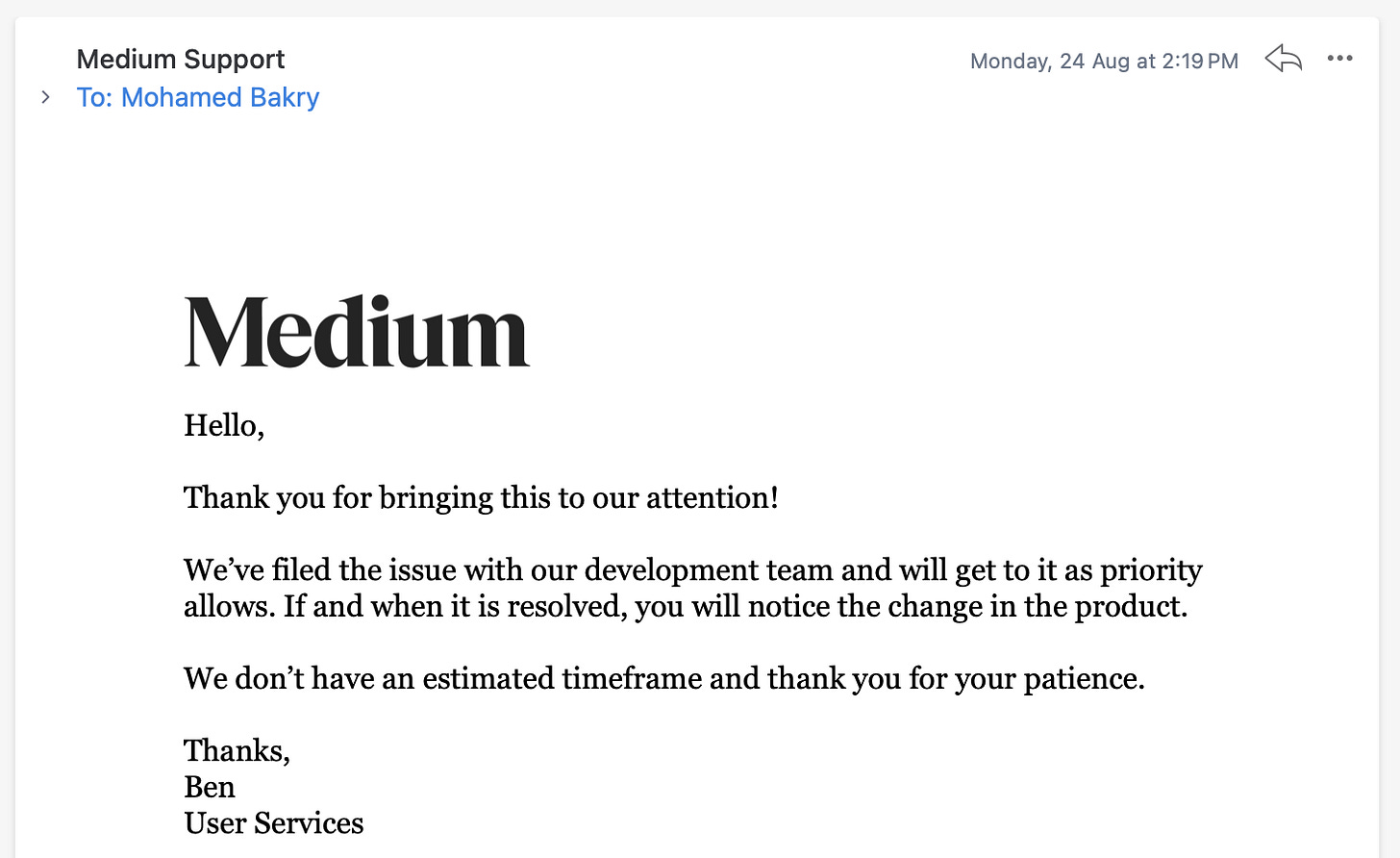
Medium acknowledged the issue but gave no deadline for resolving it.
I could not leave hundreds of articles waiting indefinitely. So I removed the custom subdomain and permanently redirected every old link to its original Medium article.
The Solution
I decided to give every story one clear home
Once I removed the Medium custom subdomain, I did not want the old links to die.
Years of articles had been shared through newsletters, social posts, author profiles, and other websites. Simply deleting the subdomain would send every visitor to an error page and waste the value of those existing links.
The correct solution was a permanent one-to-one redirect.
An old address such as:
https://blog.howtoprofitai.com/your-chatgpt-history-just-went-public-on-google-heres-what-i-did-in-10-mins-to-fix-it-103c6b88c8ba
needed to lead directly to:
https://medium.com/how-to-profit-ai/your-chatgpt-history-just-went-public-on-google-heres-what-i-did-in-10-mins-to-fix-it-103c6b88c8baThe Cloudflare redirect that solved it
My main domain,howtoprofitai.comis a WordPress website. The old blog subdomain had been connected to Medium.
That meant the redirect did not belong inside WordPress. The request needed to be handled before it reached the WordPress website.
I used Cloudflare.
First, I removed the old Medium address records for the blog subdomain. I then created a proxied A record:
Type: A
Name: blog
IPv4 address: 192.0.2.1
Proxy status: Proxied
Cloudflare recommends this reserved address when a hostname exists only to perform a redirect. The request is redirected before Cloudflare tries to reach that placeholder address. Cloudflare’s subdomain redirect guide.
Then I created one Redirect Rule.
The matching condition was:
(lower(http.host) eq “blog.howtoprofitai.com”)
In plain English, this means:
Apply the rule only when someone visits the old blog subdomain.
The destination was:
concat(”https://medium.com/how-to-profit-ai”, http.request.uri.path)
In plain English:
Add the old article path to the new Medium publication address.
I selected:
Status code: 301
Preserve query string: Disabled
A 301 tells browsers and Google that the article has permanently moved.
Disabling query-string preservation removes unnecessary additions after a question mark, such as ?source= or ?sk=, leaving a cleaner destination address.
One rule redirected the entire publication while preserving every article path.
Why I did not redirect everything to the homepage
It would have been easier to send every old URL to:
https://medium.com/how-to-profit-ai/
That would also have been the wrong solution.
Someone following a link to a specific surgeon story should arrive at that story, not at a general publication homepage.
Google advises site owners to map every old page to its corresponding new page. Redirecting many unrelated old pages to one homepage can confuse visitors and may be treated like a missing page.
The path-preserving rule gave each old article an exact replacement.
And all 575 URLs are working fine now.
Things to keep in mind after activating the redirect
A redirect is the beginning of the recovery, not the end.
I recommend taking these steps:
- Test the homepage and at least ten old article links.
- Confirm that every old URL returns a 301 and reaches the matching Medium story.
- Update links you control in newsletters, social profiles, menus, and author pages.
- Keep the redirects active for at least one year, preferably indefinitely.
- Keep the old Search Console property so you can monitor the migration.
- Expect old URLs to appear as “Page with redirect.” That is now the correct status.
- Remove the obsolete sitemap submission after confirming that the old articles redirect correctly.
- Review articles that still remain outside Google under their Medium addresses.
- Consolidate stories that answer nearly the same question.
- Strengthen firsthand experience, evidence, author background, and sourcing.
Google says a site move is processed one URL at a time and may take weeks or longer. Permanent redirects do not cause a loss of PageRank, but visibility can fluctuate while Google revisits the old and new addresses.
What authors should decide before connecting a domain/subdomain to Medium
Before attaching a domain or subdomain, answer one question:
Where should this article permanently live?
If the answer is Medium, treat the Medium publication URL as the original and keep all links consistent with it.
If the answer is your website, publish there first and set the Medium copy to identify your website as the original source.
Do not keep changing the answer.
A branded address looks professional, but ownership matters more than appearance. If the platform controls the sitemap, redirects, and page settings, you may carry the responsibility for search performance without having enough control to correct it.
That tradeoff is easy to miss until the traffic disappears.
FAQs
Q: Does connecting a custom domain to Medium hurt SEO?
A: Not by itself. Problems arise when the same article appears under multiple addresses and the sitemap, preferred address, redirects, and internal links send conflicting instructions.
Q: Why did Google discover my Medium articles but not index them?
A: Google may discover a URL without visiting it, especially when it is a thin tag page or one of many similar URLs. It may also visit an article and decline to index it because another URL appears to be the official version or because the article does not provide enough original value.
Q: What is a canonical URL in plain English?
A: It is the official home address of a page. When the same content appears through several URLs, this setting helps Google decide which one should appear in search results.
Q: Should I delete old subdomain articles after leaving Medium’s custom domain?
A: No. Keep the old hostname active and permanently redirect every article to its matching Medium URL. Deleting the hostname would break old links.
Q: Should I use a 301 or 302 redirect?
A: Use a 301 when the move is permanent. A 302 is intended for temporary moves.
Q: Can a WordPress redirect plugin handle the old Medium subdomain?
A: Usually not, unless that subdomain is configured to send its requests to the WordPress server. A Cloudflare rule is simpler because it handles the subdomain before the request reaches WordPress.
Q: What if an article was originally published on my website?
A: Keep your website as the official source and set the Medium article’s canonical link to the original page. Medium states that only the story’s author can change this setting.
Q: Does submitting a sitemap guarantee indexing?
A: No. A sitemap helps Google discover preferred URLs, but Google still decides which pages to crawl and include.
The lesson I wish I had known earlier
I connected the subdomain because I wanted the publication to look more established.
What I did not understand was that a branded address is not the same as a stable home.
A story can have many doors, but it still needs one front door.
Once Google sees different addresses, mixed instructions, and repeated versions, it has to choose for you. Sometimes it chooses another URL. Sometimes it chooses nothing.
The safest path is simple: decide where each article belongs, keep every signal aligned with that decision, and make every old link lead directly to the page that replaced it.
Readers should never have to wonder where a story went.
Neither should Google.